
Installation
NOTE
IPP requires Immich 3.0.0 or newer. It checks the server version at startup and will exit with an error against an older Immich.
Install with Docker / Podman
Download the docker-compose.yml file.
Update the value for
IMMICH_URLin your docker-compose file to point to your local URL for Immich. This should not be a public URL. Most likely this will be a local IP and port; whatever your Immich container runs on.Update or remove the value for
PUBLIC_BASE_URL. This should be the public base URL for IPP, without a trailing slash (examplehttps://photos.example.com). If you remove this value, it will dynamically generate it based on the request hostname. This can be useful if you are serving from multiple domains.Start the docker container. Check the container console output for any error messages.
docker-compose up -dPoint your reverse proxy at the container on port 3000, so IPP is served over HTTPS at your
PUBLIC_BASE_URL. See Put IPP behind a reverse proxy for Caddy, nginx and Traefik examples. You can test that it is working by visitinghttps://photos.example.com/share/healthcheck.Set the "External domain" in your Immich Server Settings to be whatever domain you use to publicly serve Immich Public Proxy:
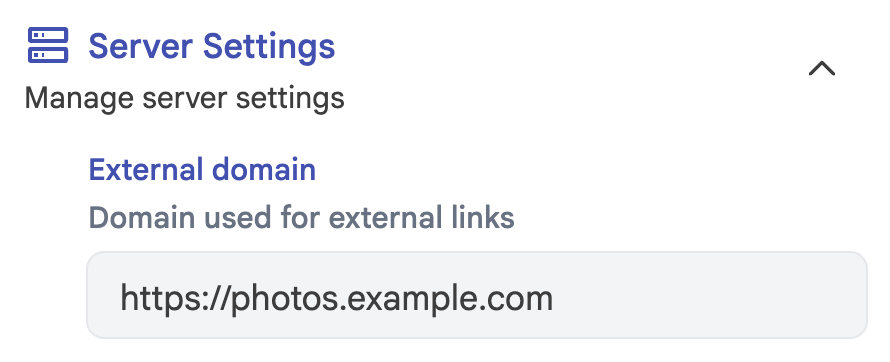
Now whenever you share an image or gallery through Immich, it will automatically create the correct public path for you.
WARNING
If you're using Cloudflare, please make sure to set your /share/video/*, /share/*/download and /s/*/download paths to Bypass Cache, otherwise you may run into video playback issues and failed zip downloads. See Troubleshooting for more information.
Those two variables are all most people need. The port and the config file location are covered under Environment variables, and everything about how galleries look and behave under Configuration.
Docker images
Images are published to Docker Hub (alangrainger/immich-public-proxy) and GitHub Container Registry (ghcr.io/alangrainger/immich-public-proxy) for linux/amd64 and linux/arm64. Each release is tagged with its full version (for example 4.0.0), its minor version (4.0) and its major version (4), and latest always points at the newest release.
The optional upload service, alangrainger/immich-public-proxy-upload, is published in the same places with the same version tags. You only need it to let visitors send photos back.
Running alongside Immich on a single domain
Because all IPP paths are under /share/... and /s/..., you can run Immich Public Proxy and Immich on the same domain. See Running on a single domain.
Install with Kubernetes
See the Kubernetes install docs.
Next: Sharing from Immich.